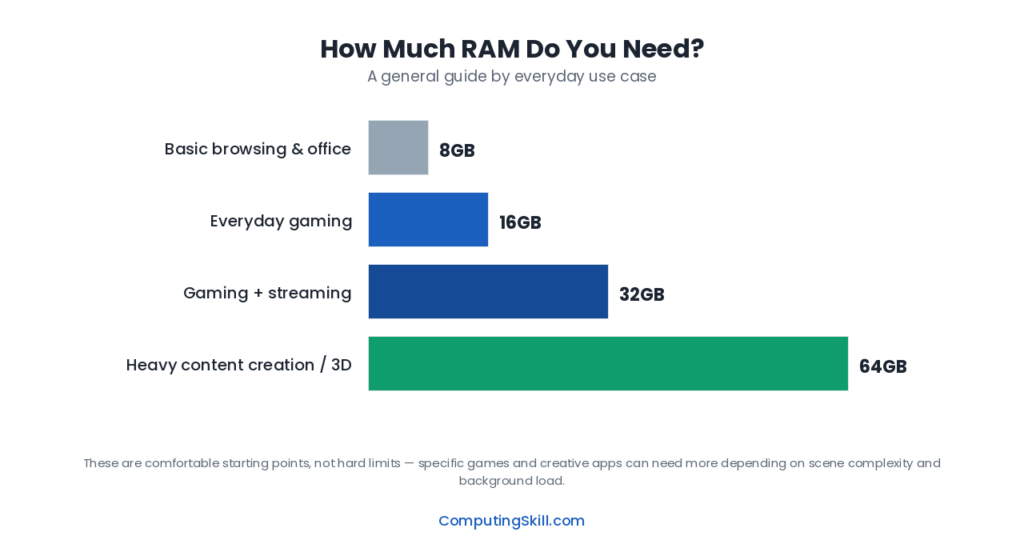
“How much RAM do I need” has a different answer for everyone, because it depends on what you run. This guide gives a minimum and a recommended figure for each common use and explains why.
For how memory works and which specs matter, see What Is RAM?.
Quick answer
For most people building a PC today, 16GB is the practical minimum and 32GB is the comfortable, future-proof sweet spot. Below 16GB you will hit real limits in browsing and gaming; 64GB is reserved for heavy video editing, 3D work, or running multiple virtual machines.
RAM by Use Case
| Use Case | Minimum | Recommended | Notes |
|---|---|---|---|
| Basic browsing / office work | 8GB | 16GB | 16GB avoids slowdowns with many browser tabs open |
| Gaming | 16GB | 16-32GB | Most current titles are comfortable at 16GB; 32GB helps with background apps and future titles |
| Live streaming while gaming | 16GB | 32GB | Game + encoder + chat overlay + browser adds up fast |
| Content creation (photo/video editing) | 16GB | 32-64GB | Scales with project resolution and timeline length |
| Software development / virtual machines | 16GB | 32-64GB | Each running VM or container needs its own dedicated allocation |
Browsing and Office Work: 8GB Minimum, 16GB Recommended
Modern web browsers are the single biggest RAM consumer on an otherwise “light” PC. Each browser tab can run as its own isolated process, and pages full of scripts, embedded video, and tracking code can easily use 200-500MB per tab. Keep twenty or thirty tabs open — which is normal for a lot of people — and you can be looking at several gigabytes consumed by the browser alone, before you even open a word processor, spreadsheet, or chat app.
8GB will technically run Windows or macOS along with a browser and office suite, but it leaves very little headroom. You will notice it as background tabs getting unloaded and needing to reload when you switch back to them, or as general sluggishness when several apps are open at once. 16GB removes that ceiling for the vast majority of everyday multitasking and is the more sensible baseline for a new system in 2026, even for users who consider themselves “light” users.
Gaming: 16GB Standard, 32GB for Peace of Mind
Most current games are built with 16GB systems in mind, and you will not typically see a frame rate improvement by going beyond that just for the game itself. Game engines allocate memory for loaded assets, physics simulation, audio, and networking, and current titles are tuned to fit comfortably inside a 16GB system alongside the operating system’s own overhead.
Where 32GB earns its keep for gamers is everything running alongside the game: Discord, a browser with tabs open, a game launcher client (or two, or three), Windows itself, and possibly recording or streaming software. Any one of these is a modest RAM user in isolation, but stacked together against a 16GB ceiling they can push a system into using slower swap space on the storage drive, which shows up as stutter and longer load times. 32GB gives you enough slack that background software stops competing with the game for memory, and it also gives your system some runway as game memory requirements creep upward over the next several years.
To size RAM for your own games and background apps, use the RAM Calculator.
Streaming While Gaming: 32GB Recommended
Live streaming adds a genuinely separate workload on top of gaming rather than a small addition to it. A hardware or software encoder needs its own memory allocation to buffer video frames, streaming software like OBS holds scene compositing and overlay data in memory, and most streamers also run a chat client, alerts overlay, and a browser for moderation tools simultaneously. Add the base game’s own memory footprint to that list and 16GB starts to feel tight very quickly.
32GB is the practical recommendation for anyone streaming regularly, not because any single piece of streaming software is enormous, but because the whole stack of game, encoder, capture software, chat, and browser running at once adds up. It also gives you room to run a second monitor’s worth of chat, alerts, and monitoring windows without cutting into the memory your game needs to run smoothly.
Content Creation: 32GB to 64GB Depending on Project Size
Photo and video editing software loads substantial amounts of data into memory to keep editing responsive. Photo editors keep multiple image layers, undo history, and preview caches in RAM, and this scales with image resolution — a stack of 50-megapixel RAW files consumes far more memory than a similar stack of 12-megapixel JPEGs.
Video editing is more demanding still. Editing software caches decoded video frames, effect previews, and timeline data, and this scales with both footage resolution and how many tracks and effects layers are stacked on the timeline. A short 1080p project with a few clips is comfortable at 32GB, and very simple edits still run on 16GB. A 4K or multi-cam project with color grading, motion graphics layers, and a long timeline is where 64GB starts to pay for itself in fewer render pauses and smoother scrubbing through the timeline.
- Photo editing, casual projects: 16-32GB
- 1080p video editing, simple timelines: 32GB
- 4K video editing, color grading, multi-track projects: 64GB
- 3D rendering, large scene files: 64GB or more, depending on scene complexity
Software Development and Virtual Machines: 32GB to 64GB
Development work is deceptively memory-hungry even when nothing looks demanding on screen. A modern code editor with language server tooling, several browser tabs for documentation and testing, a local development server, and a database instance running in the background can individually seem modest but collectively consume a large chunk of 16GB before you have written a line of code.
Virtual machines and containers make this dramatically more pronounced, because each virtual machine effectively needs its own dedicated slice of RAM set aside for its own operating system and workload — memory allocated to a running VM generally isn’t available to the host system or other VMs at the same time. Running one or two VMs alongside a full development environment is a realistic reason to move to 32GB, and running multiple VMs simultaneously, or working with memory-intensive services like local databases and containerized microservices stacks, is a good reason to consider 64GB.
DDR4 vs DDR5 and Capacity Planning
The generation of RAM you buy is a separate decision from how much of it you need, but it affects how you get there. DDR5 offers higher bandwidth than DDR4 and is standard on current-generation platforms, though it typically carries a price premium per gigabyte. If you are planning capacity on a budget, it is usually smarter to prioritize hitting your target GB figure on the appropriate generation for your motherboard rather than stretching to a marginally faster kit at a smaller capacity. For a full breakdown of the practical differences, see our DDR4 vs DDR5 comparison.
Also consider running dual-channel kits (two matched sticks) rather than a single stick of the same total capacity. Dual-channel configurations give the memory controller two paths to fetch data simultaneously, which helps most in CPU-limited games and other memory-heavy work; when the graphics card is the limit, the gain is small.
Key Takeaways
- 16GB is the practical floor for a modern PC; 8GB is workable only for very light browsing and office use.
- 32GB is the comfortable sweet spot for gaming with background apps, streaming, and moderate content creation or development work.
- 64GB is for heavy video editing, 3D work, or running multiple virtual machines and containers at once.
- More RAM than your workload needs doesn’t improve performance — match capacity to what you actually do, not to the biggest number available.
- Buy matched dual-channel kits when possible, and check DDR4 vs DDR5 compatibility against your specific motherboard before purchasing.
Frequently Asked Questions
Is 8GB of RAM enough in 2026?
8GB is workable only for very light use like basic web browsing with few tabs and simple office document editing. Gaming, streaming, content creation, and modern multitasking will feel constrained on 8GB, so 16GB is the more realistic minimum for a new system.
Does more RAM increase FPS in games?
Only up to the point where your current RAM amount is causing a bottleneck. Once a game has enough memory available, adding more RAM beyond that point generally does not increase frame rate — the GPU and CPU become the limiting factors instead.
Is it better to have one large RAM stick or two smaller ones?
Two matched sticks running in dual-channel mode is generally better than one single stick of the same total capacity, because dual-channel configurations let the memory controller access data through two paths at once, improving performance in games and other memory-sensitive workloads.
Can I add more RAM later instead of buying a lot now?
Yes, as long as your motherboard has open RAM slots and you buy a matching kit (same speed and, ideally, same brand/timings as your existing sticks) when you upgrade. Check your motherboard’s maximum supported capacity and slot count before assuming you can expand later.
Do I need 32GB of RAM just for gaming with no streaming or extra apps?
Not strictly — most current games run fine on 16GB by themselves. 32GB becomes worthwhile mainly when you also run background apps like Discord, a browser, and a game launcher at the same time, or want extra headroom for future titles.