
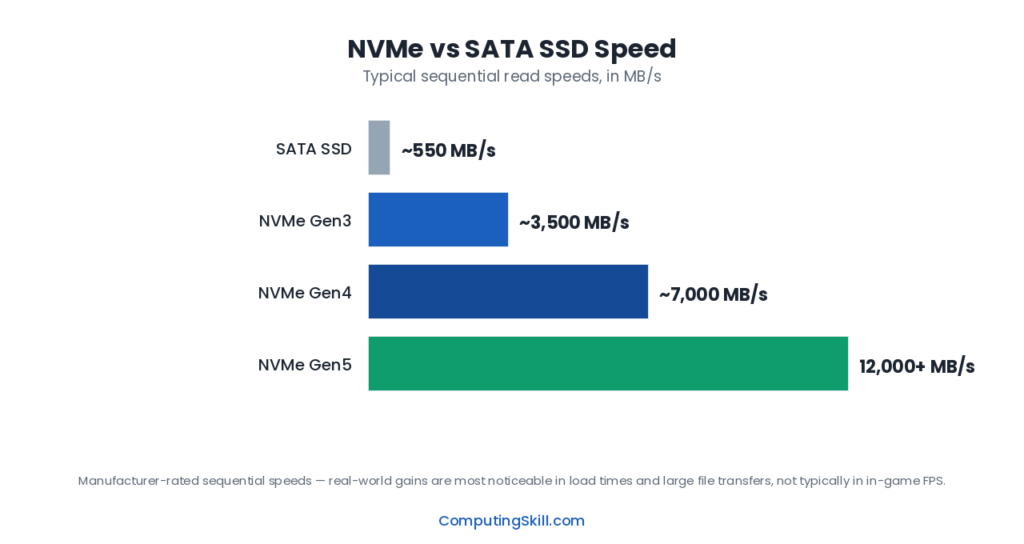
Both NVMe and SATA describe solid-state drives — the “no moving parts” advantage over hard drives applies to both. The difference between them is the interface and protocol used to talk to the rest of your PC, and that difference produces a genuinely huge gap in maximum speed on paper. What’s less obvious is how much of that gap you’ll actually notice depending on what you use your PC for. This comparison covers the real-world speed difference, where it does and doesn’t matter, and the physical and platform compatibility basics you need to know before buying.
| Factor | SATA SSD | NVMe SSD |
|---|---|---|
| Interface | SATA III (uses AHCI protocol) | PCIe (uses NVMe protocol), typically via M.2 slot |
| Max theoretical speed | ~600 MB/s interface limit, real-world sequential tops out around 550 MB/s | PCIe 3.0: ~3,500 MB/s. PCIe 4.0: ~7,000 MB/s. PCIe 5.0: higher still |
| Physical form factor | 2.5-inch drive with separate SATA data and power cables, or M.2 SATA | M.2 slot, connects directly to the motherboard (no cables) |
| Typical price | Generally cheapest per GB among SSDs | Slightly to moderately more per GB, gap has narrowed a lot |
| Where speed matters most | General use, OS, most games | Large file transfers, video editing, content creation, heavy multitasking |
| Where speed barely matters | — | Game load times (often nearly identical to SATA in practice), general web browsing |
| Compatibility | Works with any board with a SATA port; most boards have several | Requires an M.2 slot; check PCIe generation for full speed |
The Real-World Speed Difference
On paper, the gap is enormous. A SATA SSD is limited by the SATA III interface itself, which tops out around 550-600 MB/s regardless of how fast the flash memory inside the drive could theoretically go — the bottleneck is the connection, not the chips. NVMe drives bypass that limitation entirely by connecting through PCIe lanes instead, and depending on the PCIe generation, can reach several times that speed: roughly 3,500 MB/s on PCIe 3.0 NVMe drives, and considerably higher on PCIe 4.0 and PCIe 5.0 drives.
That’s a real, measurable difference — but it only translates into a noticeably better experience in specific situations. Sequential read/write speed (the number usually advertised) matters most when you’re moving large, continuous chunks of data: copying a large video file, transferring a big folder of photos, or writing large game installation files. In those tasks, an NVMe drive can finish a transfer in a fraction of the time a SATA drive would take.
For a huge portion of everyday computing, though, sequential speed isn’t actually the limiting factor. Booting an OS, launching applications, and browsing the web depend more on random access speed and latency — reading lots of small, scattered files quickly — where both SATA and NVMe SSDs perform far better than an HDD, but where the difference between the two SSD types narrows considerably, because neither is bottlenecked by mechanical seek time the way an HDD is.
Where the Difference Actually Matters
- Large file transfers — moving multi-gigabyte files or folders, where NVMe’s higher sequential throughput directly cuts transfer time.
- Video editing and content creation — working with large raw video files, especially at high resolution, benefits substantially from NVMe’s higher sustained read/write speeds.
- Heavy multitasking with large working files — professional workloads juggling multiple large files at once benefit from the extra headroom.
- Game installation and patching — copying large game files during install or updates is faster, though this is a one-time cost rather than an ongoing experience difference.
Where the Difference Barely Matters
- Game load times — once a game is installed, in-game load screens are often nearly identical between a good SATA SSD and an NVMe drive, because load times are frequently limited by other factors (CPU decompression, engine design) rather than raw storage throughput.
- General desktop responsiveness — opening applications, browsing, and everyday multitasking feel very similar on both, since both comfortably clear the threshold where storage speed stops being the limiting factor for these tasks.
- Boot times — both SSD types boot an OS dramatically faster than an HDD, and the SATA-vs-NVMe difference in boot time specifically is usually small.
Compatibility: M.2 Slots, SATA Ports, and PCIe Generations
SATA SSDs typically come in a 2.5-inch enclosure and connect via a SATA data cable and a separate power cable, just like a traditional laptop-style hard drive — meaning they work in essentially any desktop or laptop with a free SATA port and available cabling, which makes them an easy universal upgrade path for older systems.
NVMe SSDs are almost always M.2 form factor, plugging directly into an M.2 slot on the motherboard with no cables at all. This is where compatibility gets more nuanced: not every M.2 slot supports NVMe — some support only SATA-protocol M.2 drives — and the PCIe generation the slot is wired for determines your real-world maximum speed. A PCIe 4.0 NVMe drive installed in a PCIe 3.0 slot will still work, but it’ll run at PCIe 3.0 speeds, not its full rated speed. Older motherboards may lack M.2 slots entirely, or only offer one or two, and some boards share PCIe lanes between M.2 slots and other components, reducing available bandwidth. It’s worth checking your specific motherboard’s documentation for M.2 slot count, supported protocols, and PCIe generation before buying an NVMe drive to make sure you’ll actually get the speed you’re paying for.
Price Considerations
SATA SSDs remain generally the cheapest per gigabyte among solid-state drives, though the price gap to NVMe has narrowed substantially as NVMe has become the mainstream default. At most common consumer capacities today, the price difference between a decent SATA drive and a decent NVMe drive is often modest enough that it’s no longer the deciding factor for most buyers — the deciding factor is usually motherboard compatibility and whether your workload actually benefits from the extra speed.
Which Should You Choose?
If your motherboard has a free M.2 NVMe-capable slot and the price difference is small (which it usually is at common capacities today), choose NVMe by default — there’s little downside, and it leaves headroom for workloads that do benefit from the extra speed, even if you don’t need it today. If you’re upgrading an older system without M.2 slots, or you specifically need to fill a secondary drive bay for bulk or secondary storage, SATA SSDs remain a perfectly good, cost-effective choice — you won’t miss NVMe speeds for general use, OS duties, or most gaming.
If you regularly work with large video files, transfer large amounts of data, or do content creation professionally, prioritize NVMe (and ideally a higher PCIe generation drive) — this is the use case where the speed difference translates directly into time saved. If you’re mainly gaming and browsing, don’t feel pressured to pay a premium for the fastest NVMe drive available; a solid PCIe 3.0 or 4.0 NVMe drive, or even a good SATA SSD, will feel very similar day to day.
Frequently Asked Questions
Will an NVMe drive make my games load noticeably faster than SATA?
Usually not by much. Most game load times are limited by factors other than raw storage throughput, such as CPU-side decompression and engine design, so the difference between a good SATA SSD and an NVMe drive in actual load screens is often small, even though NVMe’s rated speed is far higher.
Can I use an NVMe drive without an M.2 slot?
Not directly on the motherboard — NVMe drives require a PCIe connection, almost always via an M.2 slot. Some PCIe expansion cards let you add an NVMe drive to a system without a free M.2 slot, using a PCIe expansion slot instead, but check compatibility carefully before relying on that route.
Does PCIe generation actually matter for everyday use?
For general use, gaming, and OS responsiveness, the difference between PCIe 3.0 and PCIe 4.0 NVMe drives is rarely noticeable. It matters much more for large sustained file transfers and professional content creation workloads that can actually push a drive’s sequential speed limits.
Is SATA becoming obsolete?
Not entirely — SATA ports remain common on desktop motherboards and SATA SSDs are still a cost-effective option, especially for secondary or bulk SSD storage. However, NVMe has become the default for primary drives on new systems as M.2 slots have become standard.
How do I know which type of SSD my motherboard supports?
Check your motherboard’s specification sheet or manual for the number and type of M.2 slots (and which PCIe generation they support) as well as the number of SATA ports available. The PC Compatibility Checker can help confirm what a given build supports.